
How to Check TM Balance: Complete Guide to TM Load and Data Inquiry
If you are a TM user, it’s essential to know how to check your balance. TM makes balance inquiry easy with different options. You can check your TM balance by text, call, USSD code, or through the GlobeOne app.
In this article, we share easy ways to check your TM balance. You can do this by SMS, phone, or online. This way, you will always know your remaining load and stay connected. If your TM SIM is still not registered, please register your TM SIM card as soon as possible, before the Filipino government blocks it.

Check TM Balance via SMS
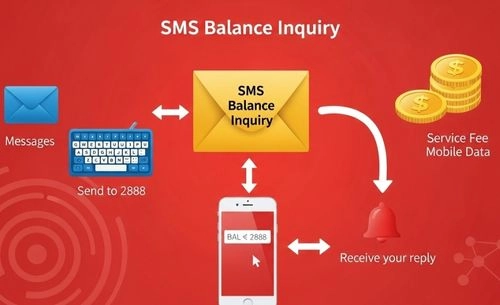
You can easily do a TM balance inquiry via SMS by following these simple steps:
- Open your Messages app on your phone.
- Type BAL in the message box.
- Send it to 2888.
- Wait for a reply from TM showing your remaining load balance, TM promo status, and validity.
- A small service fee may be deducted for every TM balance inquiry via text.
Additional Tip: This method works without mobile data. It is the fastest way to check your TM balance via SMS anytime.
How to Check TM Balance through Call
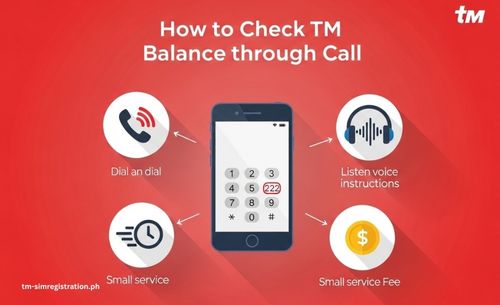
You can also check your TM balance by phone. Follow these easy steps:
- Open your dial pad on your TM mobile.
- Dial 222 and press the call button.
- Listen to the voice instructions carefully.
- Your remaining balance will be announced shortly.
- A small fee may be deducted for this TM balance inquiry via a call.
Additional Tip: This method is excellent for quickly checking your TM balance. You don’t need to type or use mobile data.
TM Balance Inquiry via USSD Code
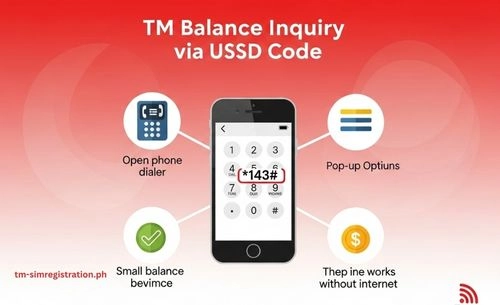
Another quick way to check a TM balance is to use the TM USSD code.
- Open your phone dialer.
- Dial *143# and press the call button.
- A menu will appear on your screen.
- Select the Balance Inquiry or Check Balance option.
- Wait a few seconds to receive your TM load balancing details via text.
- Some USSD balance checks may deduct a small service fee.
Additional Tip: You can quickly check your TM balance using the TM USSD code. It is fast and reliable, and you don’t need an internet connection. Visit this guide if you want to share your balance with TM or Globe.
Check TM Load Balance Using the GlobeOne App
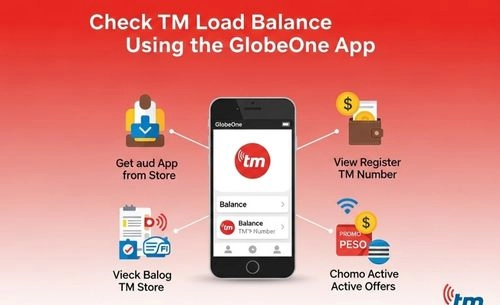
You can also check your TM balance and promos online using the GlobeOne App.
- Download and Install the GlobeOne app from the Google Play Store or App Store.
- Open the app and register your TM number.
- Once logged in, your remaining load balance will be displayed on the home screen.
- You can also view your active promos, data balance, and validity inside the app.
- This method is free, and you can check your TM balance online anytime.
Additional Tip: Using the GlobeOne app is the easiest way to check your TM load balance and monitor promos. Just make sure you have mobile data or Wi-Fi.
How to Check TM Data Balance
If you want to check your remaining TM data balance, there are a few easy ways to do so. Follow these steps:
- Open your Messages app.
- Type DATA BAL and send it to 8080 to see your remaining MBs or GBs.
- You can also text EZ INFO or SURF BAL to 8080 for details about your active promos, data balance, and validity.
- Another option is to check your data balance in TM using *143#.
- Go to the menu and select Data Balance to view your remaining MBs.
- You can also open the GlobeOne App to see both your load balance and data usage in one place.
Difference Between TM Balance and Data Balance
| 💡 Feature | 💰 TM Balance | 🌐 Data Balance |
|---|---|---|
| Definition | Refers to the credit/load for calls, SMS, and other non-data services. | Refers to the credit/load for mobile internet usage (data). |
| Usage | Used for making calls, sending SMS, and activating voice/text promos. | Used for browsing the internet, using apps, streaming, and other online activities. |
| Consumption | Decreases when you make calls, send text messages, or use non-data services. | Decreases when you use mobile data for internet-related activities. |
| How to Check | – SMS: Send BAL to 222– USSD: Dial *143#– GlobeOne App | – SMS: Send DATA BAL to 222– USSD: Dial *143#– GlobeOne App |
| Examples | Call charges, SMS, and regular voice/text promos. | Internet browsing, using social media apps, streaming, etc. |
How to Inquire Balance in TM Without Internet
If you don’t have an internet connection, there are still easy ways to check your balance with TM. TM allows users to check their load balance even without mobile data. You can send an SMS, use a USSD code, or make a short call to get your remaining balance instantly.
To check your TM balance via SMS, type BAL and send it to 2888. You will receive a reply showing your remaining load and promo details. Another option is to dial 143# or 2888#, which are the official USSD codes for TM balance inquiry. These codes work on any phone, even without data.
You can also check your TM balance by calling 222 and following the voice instructions. TM will announce your balance amount after a few seconds. These methods let you check the TM balance anytime, anywhere, even without an internet connection.
FAQs
How can I check my TM balance?
You can check your TM balance by typing BAL and sending it to 2888. You will receive an SMS showing your remaining load balance and promo validity.
What is the USSD code for TM balance inquiry?
The official USSD code for TM is *143#. Dial it and choose the “Balance Inquiry” option to view your remaining balance.
Can I check my TM balance over the phone?
Yes, dial 222 and follow the voice instructions. TM will automatically tell you your current balance.
How to check TM load balance via text?
Simply send BAL to 2888. You will receive a text message from TM showing your available load.
How to check TM data balance?
To check your TM data balance, send DATA BAL to 8080. You will get a message with your remaining data and expiration date.
Why am I not getting my TM balance after texting BAL to 2888?
Make sure you have good signal coverage and that your SIM is active. If you still don’t receive a reply, try restarting your phone or using *143# instead.
Conclusion
Checking your TM balance is quick and effortless with several easy options available. Whether you prefer to check your TM balance via SMS, USSD code, or call, TM keeps you updated on your remaining load at any time. You can simply text BAL to 2888, dial *143#, or call 222 to know your balance instantly, even without an internet connection.
These easy TM balance inquiry methods help you manage your load. You can track your usage and prevent unexpected service interruptions. Next time you want to check your TM balance, use these easy steps to stay connected anywhere.